Taylor Orth, YouGov, about using Datawrapper to visualize public opinion


Taylor Orth from YouGov spoke at our Unwrapped conference about "Using Datawrapper to visualize public opinion."
Taylor Orth is the director of survey data journalism at YouGov, where she collaborates with journalists inside and outside the company to design, analyze, and visualize surveys on social, cultural, and political topics. She uses Datawrapper on a daily basis to create engaging visualizations of public opinion data, which are published to YouGov's website.
Watch her talk here:
01:33 – How YouGov uses Datawrapper
04:23 – Tip 1: Plan ahead if possible
07:17 – Tip 2: Balance simplicity & transparency
11:10 – Tip 3: Deal with different response options
13:04 – Q: Visualizing margins of error?
14:06 – Q: Onboarding new chart designers?
15:40 – Q: Overcoming creative roadblocks?
17:21 – Q: Navigating huge Datawrapper chart libraries?
Full transcript
[00:00:04] Taylor Orth: Thank you for the introduction. It's a pleasure to be here talking about two of my favorite subjects, polling and data visualization. As you mentioned, I'm the director of survey data journalism in the U. S. at YouGov, which is an online polling firm. I also have a PhD in sociology. I'm currently based in Austin, Texas. I work with a small team that brainstorms ideas for public-facing polls for YouGov. We write stories about them, and most relevant to why I'm here today, we visualize the results using Datawrapper. We do national polling on a really wide range of topics, including politics and elections, especially recently, culture, technology, sports, entertainment, you name it. We use Datawrapper on a daily basis, and when I started a few years ago, I was hooked pretty much immediately. Primarily, as other people have mentioned, by its ease of use. In my opinion, it's a tool that strikes just the right balance in being adaptable enough to use in a variety of situations, as well as being intuitive and just really user-friendly. Today I'm going to give you some insights into how and why my team at YouGov uses Datawrapper and offer a few tips that we've picked up along the way, which in some cases are specific to public opinion data, which is the area that I'm most familiar with, but also will be helpful in some other contexts.
And then I'm happy to take questions at the end, or you're also welcome to reach out to me.
How YouGov uses Datawrapper
[00:01:33] Taylor Orth: So in order to keep up with recent news and events, the polling that we do is often really quick turnarounds. It's also public-facing, which means that we need a system that's both streamlined and also looks good. For us, Datawrapper really fills both of those requirements. At YouGov, some people might say that charts are our love language. They're the primary way that we share our findings with the public. They're on our website, on social media, embedded in news stories of organizations that we partner with. And we take really seriously the responsibility to make sure that we're accurately and fairly conveying the opinions of respondents who took the time to participate in our surveys.
We make a lot of charts. I've been at YouGov a little over two years, and according to the website that I looked at last night, I've made roughly 3, 000 charts using Datawrapper. I even attempted to make this slide using Datawrapper. And it's really our primary tool. While we have explored other options. It's not our primary tool just because we haven't looked for any others.
We've definitely looked, and honestly, there's really not any other software that I found that checks all the boxes that Datawrapper is able to. In terms of our style, our signature style is typically horizontal bars in our standard color theme. But that said, we really do try to explore a lot of different styles of charts.
Most often to look at either how opinions vary by group, which we typically use bars over time, using lines, or by place, using maps. When it comes to charts, clarity and transparency are really top priorities for us. We want our findings to be shared far and wide, and Datawrapper has a lot of tools that further that aim: features like tooltips, data download, embed links. And in terms of clarity, we typically opt for chart designs that are really simple and can be understood in pretty small bytes, which Datawrapper makes really easy to do quickly.
One thing that's great about Datawrapper is that it's really versatile. People on our team have different backgrounds and have found different ways to work Datawrapper into their unique workflows. Some colleagues use the API using R, as others have mentioned so far. Other people tend to feed the data directly into the browser. But what I really like is that, regardless of the roads that we take to get there, the simplicity of the platform means that all of our charts end up looking consistent in our style as we would like them to.
Tip 1: Plan ahead if possible
[00:04:23] Taylor Orth: Okay, now I'm going to talk about a few tips for visualizing survey data. A little easter egg here: this chart here is who people expect to win the 2024 election using our most recent data from The Economist.
Okay, the first tip I want to touch on is planning ahead. And by that, I mean that it helps to think about visualization before you've even begun to visualize the data. My primary job at YouGov is conducting surveys. And there are many factors that a person needs to consider when designing a survey.
Some of these are given more attention than others. Perhaps the most obvious consideration is the experience of the respondent, whether the response options we provide are inclusive and will accurately reflect their views. And this really is a top priority. But, there's another step that many people skip that is possible to do here as well, which is to consider another audience when designing surveys.
And in this case, that is the audience who's encountering our results and making sure that they're able to have a clear understanding of what we're conveying to them. So I'm going to show one example of a question that we frequently ask about the legality of abortion. You can see here the response options are quite long.
It might take a while for someone glancing at the chart without much time to digest. One way that we might go about fixing this is by adding a little note at the bottom that explains the full response options while abbreviating them in the legend. We always want to be transparent in trying to make sure that the responses that we show our respondents are the same ones that people who are viewing the charts see, so that they're boasting the same thing. And one way to do this is through a note.
But if you're able to design your own surveys and want to take this into consideration, one alternative is to consider what the visualization will look like in the planning phase of designing a survey. So that might mean coming up with different response options, which I'm just showing one example of something we experimented here, asking the question in a different way with shorter response options that might still be able to capture the same information as the longer ones, but might make for a better visualization.
Now, this won't always work. This is something that you have to test, and that can take some consideration in terms of making sure you don't lose anything in what you're conveying to your respondents. But overall, the point here is that if you spend some time up front in questionnaire design, you might end up with an overall simplified visualization.
Tip 2: Balance simplicity & transparency
[00:07:17] Taylor Orth: The second tip I want to touch on is about balancing simplicity and transparency in charts, something that Datawrapper makes really easy, in my opinion. We're regularly faced with a question that I'm sure many of you are familiar with: how much data should we show? Will we lose anything? Will we lose people by overwhelming them with too much information or possibly cause misunderstandings by oversimplifying our findings?
For these types of decisions, Datawrapper has become almost, I think others have mentioned this too, an exploratory data analysis tool, in addition to a tool that we use to present and explain results to others. On the next few slides, I'm going to talk you through the process of exploring a few different ways we might consider presenting results, from a survey that we did on whether or not different U. S. military interventions were successful in a variety of countries. I want you to keep in mind, though, there's really not one right or wrong way. There's just different considerations that you can take as you work through the process.
We're going to start with the most condensed version here. And this is looking at the net success of each military intervention that we asked about. That means the bars here represent the share of U. S. adults who say that each intervention was entirely or mostly successful, minus the share who say each was entirely or mostly unsuccessful. You'll see World War II at the top, Vietnam at the bottom.
But for this instance, let's take a look at one specific example of the Civil War in Yemen. The takeaway from this chart might be that more people think it's an unsuccessful, net negative 12, than successful. But one thing with net results is that we don't know what share of Americans think it's been unsuccessful.
It could be a majority of people, say 57 percent, or it could even be as low as 12 percent. We also don't know what all the response options were. In the next version, you'll see that we separate out the shares who say that interventions have been successful and unsuccessful using the mirrored bars here.
This chart shows that it's far less than a majority, in fact, just 28 percent, who say that the U. S. intervention in Yemen has been mostly unsuccessful.
And the next slide, we'll see what's missing: the often overlooked not sure response. Something that comes up really often when visualizing public opinion data. It turns out that most people, 55%, aren't sure about the success or failure of U. S. intervention in Yemen. Perhaps fewer people have strong opinions, or opinions at all, on the issue than we initially thought.
You can get even more granular here by using stack bars here that we often use, looking at separating out even further the categories. When I say Datawrapper is an exploratory data analysis tool, I mean that one step that we're often doing is putting the full data in and then trying out these different scopes, zooming in and out of different ways to look at the data.
And. In this example, what you'll often find when I mention the not sure responses is that sometimes these can be a story all on their own. Here, we looked at the percentage of men and women who said they weren't sure about these different interventions and found that it was actually pretty interesting that women were far more likely than men to say that they weren't sure about the success of these interventions.
Don't drop the “not sure” responses right away. It is the message here.
Tip 3: Deal with different response options
[00:11:10] Taylor Orth: A third tip I want to give is talking about separate scales. By separate scales, I mean response scales. Oftentimes, we're visualizing survey questions, and they don't always have the same response options, which can make it difficult to combine them into one chart that we might embed.
One thing we do often is what you can see here, indicating what kind of code we use to create this sort of display. On the left, we have different issues. This was in the midterm elections, asking people whether their votes were for or against different things.
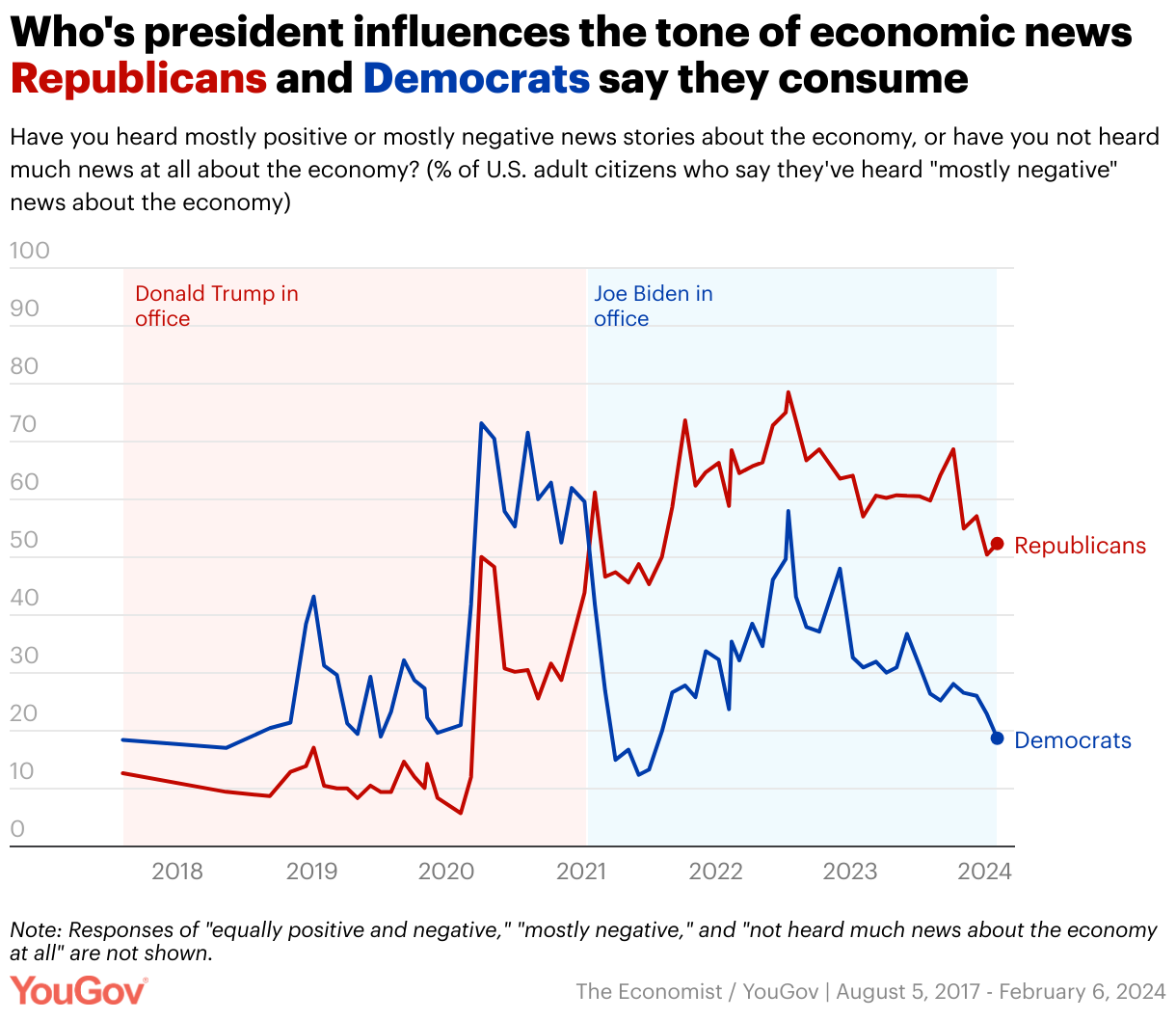
We wanted to put all these results in one chart, so people might be able to compare across. But the response options were different, so a shared legend wasn't going to work. The same thing on the chart on the right, asking about horror movies. And just a few more examples here. Anyway, this is a quick tip, but it's something that's really come in handy for us is using color coding to include many different types of questions in one chart, without having to split it up.
But the last thing I'll note is that you can avoid this problem by planning ahead. And if you have the chance to design a survey, one thing you might consider is trying to coordinate response options so that you can include them all more easily in one chart with a shared legend.
So that's all I have for today. I want to thank Datawrapper so much for having me speak. It's been a really wonderful tool. I absolutely love it and was really honored to have this opportunity. So happy to answer any questions.
Q: Visualizing margins of error?
[00:13:04] Michi (host): Thank you so much, Taylor. That was a really fascinating talk with lots of great insights into your process. I especially love the way that you also showed the different sorts of ways that you could present, in theory, the same data, and it comes up with a completely different message or focus. So thank you very much for that.
To everyone that's listening, feel free to post any questions that you have for Taylor in the comments, and we'll pass them on. We have the first one here from Eike Hoppman, and it is: What is your approach to visualize margins of error?
[00:13:38] Taylor Orth: Yeah, it's a good question. So we don't typically visualize the margin barrier in our charts. We usually include that information in the text. But it is something that we've definitely considered. And I think our main priority is keeping the charts as simple as possible. And sometimes adding in margin variables can complicate them a little bit, but it's definitely something that can be helpful.
Q: Onboarding new chart designers?
[00:14:06] Michi (host): Thanks for that. I have two questions, actually, and we still have a bit of time, so I'll just go with them. The first one, and I don't know if you can answer this one, or if it's private information from YouGov, but what I loved is the uniformity of all the different charts, and they're all really slick, and still actually quite complex on the back end, and I'm wondering: When you get new people coming into YouGov, in general, what is the process there for getting people up to speed and ensuring this kind of uniform design?
[00:14:37] Taylor Orth: Well, it helps that we work on a really small team, so there aren't that many people to get up to speed. But I think Datawrapper really just makes that easy. Like you could imagine with another tool, using ggpot, for example. Those tools can take a really long time to get caught up on. You have to learn a lot more of other things before you can even dive into visualization. But we've had interns come on our team and pick up Datawrapper in a day. In terms of keeping the same color scheme and everything, Datawrapper makes that really easy with our company themes that makes it so we just pop in the data and everything else is formatted as we would generally want it to be.
So yeah, that's really streamlined, getting people caught up and being able to use the tool. It's just in my opinion, the easiest tool to use. The fact that you can just paste the data in, you don't even need to go use upload at all, just makes it really easy.
Q: Overcoming creative roadblocks?
[00:15:40] Michi (host): Okay, thanks for that answer. I want to close on a more general question, but also on the process itself. And I was wondering, when I was viewing all these things, and you have all these different ways of sculpting the data you receive, and no doubt you receive a bunch of data as well.
Do you ever receive sort of data drops and drafts and then hit a roadblock in terms of messaging or narrative, a writer's block in finding a story in the data? And if so, how do you overcome that?
[00:16:11] Taylor Orth: Yeah, that's a great question. I think I would say it's twofold. The first step is the exploratory stuff that I mentioned earlier in Datawrapper. When you upload data, you don't have to make the decision immediately on what type of chart you want. You can click around, see how different ones would look. So I spent a lot of time doing that, playing out with different options, different ways of sorting. That's something I didn't even get to, but I think it's really important in terms of how your story is formed.
And then the second thing is getting feedback from other people on our team. We have an internal Slack channel where we'll share our charts and ask for feedback. Sometimes I'll share a bunch of versions and see which people like the best. So I think in data visualization, if you're working alone, you're probably not going to get as good results as you would working with other people. Because it's hard to know how anyone's going to interpret a chart until others have had the chance to look at it and tell you what they think.
So I would say those are the two things that I do to play around and get past those roadblocks.
Q: Navigating huge Datawrapper chart libraries?
[00:17:21] Michi (host): Thank you. We actually have one last question. I just want to throw this one in before we close off here. We have it from Nastasia. Thank you, Taylor. Do you have any tips for navigating and managing such a huge Datawrapper charts library among the team?
[00:17:36] Taylor Orth: I wish I did. I have learned a lot so far, even in these different sessions. Currently, we have a pretty broad approach of tossing everything in one area, mostly because it's just so quick turnaround, and we're working on things really quickly.
But I think that I'm excited to learn more about organizing them. But I think, honestly, even just having them all in one place really hasn't caused any major problems for us. I think because Datawrapper has a pretty good search function, and we're able to create charts so quickly.
A lot of times, sometimes we'll just even create a new one from scratch because it's so quick, rather than going back and finding an older one that I've done in the same format. So yeah. Check out some of the recordings from earlier for some tips on organization.
[00:18:37] Michi (host): All right. Taylor, we're gonna move on to the next speaker. Thank you so much for presenting, sharing some insights into the inner workings of YouGov. It's really fascinating. Hope you stick around for the rest of the talks. Also, for these tips on the organization of folders. But thank you so much, Taylor.
[00:18:53] Taylor Orth: Appreciate it. Bye.
We asked Taylor a few questions before her talk:
Taylor, what will you talk about?
My talk will explore ways to use Datawrapper to distill complex public opinion data into accessible visual narratives. I'll share strategies for increasing the clarity and appeal of your visuals, alongside common pitfalls to steer clear of. Through real-world examples and practical tips, I'll offer insights to help you transform survey data into meaningful stories that inform and engage.
What's your guiding principle when working on data visualizations?
Keep it simple, and be transparent.
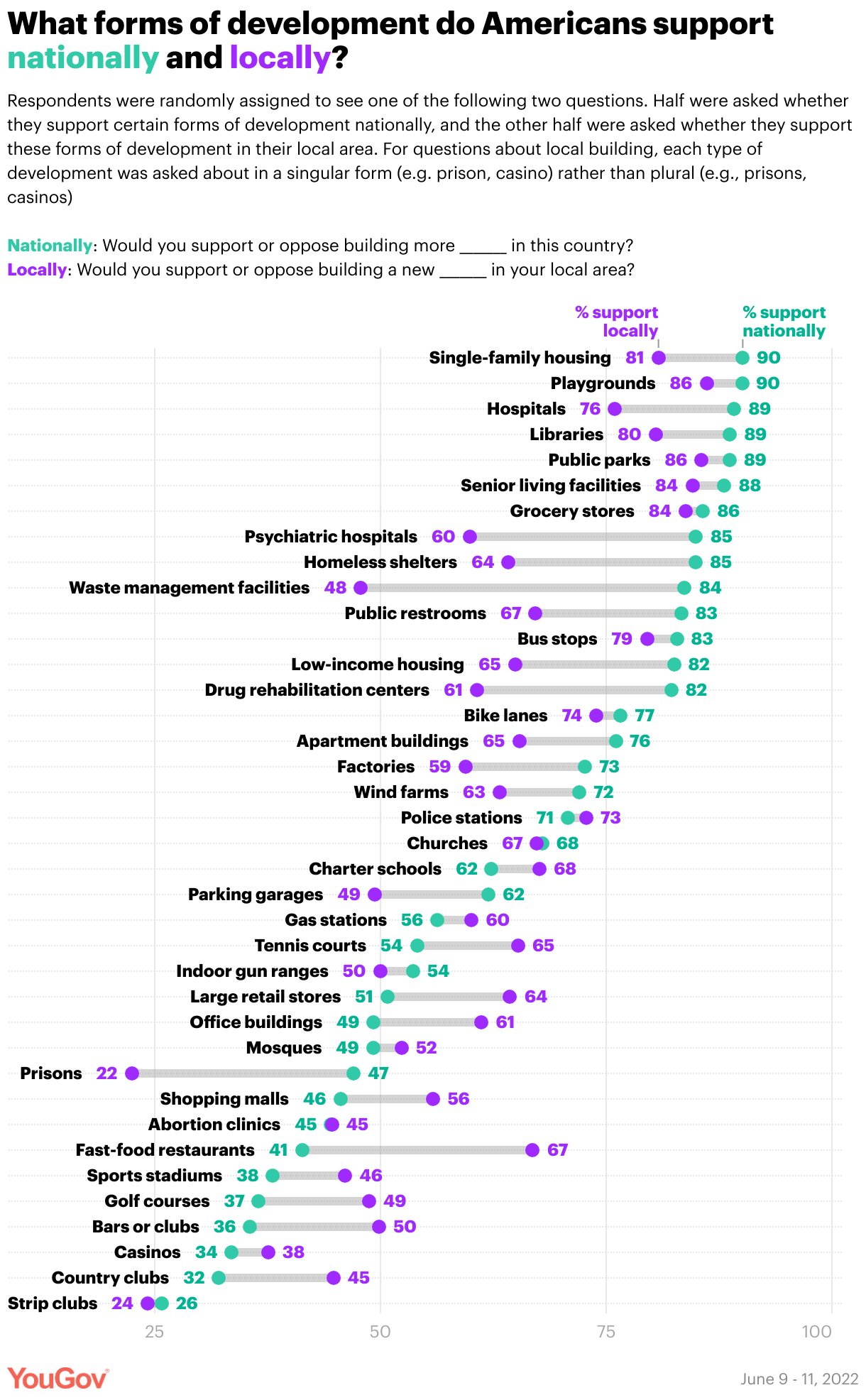
When it comes to charts, clarity and transparency are top priorities for us. We want our findings to be shared far and wide, and Datawrapper has a lot of tools that further that aim: features like tooltips, data download, and embed links. Taylor Orth, YouGov, in minute 3:18 of her talk at Unwrapped 2024
What's your favorite Datawrapper feature?
The "data download" option — I love seeing how inventive our readers are when they repurpose our survey data in unique ways.
We loved Taylor's talk at Unwrapped! You can find more about her on X, LinkedIn, and her YouGov author page. To learn more about Unwrapped and hear other great speakers, visit our blog.