Ben Kates, Urban Institute, about extending Datawrapper tooltips with Svelte


Ben Kates from the Urban Institute spoke at our Unwrapped conference about "Creating extended Datawrapper tooltips with Svelte."
Ben is a Data Visualization Developer on the Communications team at the Urban Institute, a research non-profit based out of Washington, D.C. He uses JavaScript tools like Svelte and d3 as well as Datawrapper and R to create digital products that communicate research findings in engaging ways. Ben lives in Philadelphia, PA and has a background in data analytics and digital marketing, working with clients across industries to create data tools that enable action and impact.
Watch his talk here:
01:56 – Technical setup
02:27 – Interaction events in Datawrapper
03:30 – What is Svelte?
05:35 – Sending Datawrapper events to a Svelte app
09:27 – Closing thoughts & resources
11:37 – Q: Using web components in Datawrapper?
13:08 – Q: Could the same work in Vue or React?
Full transcript
Introduction
[00:00:04] Ben Kates: Thanks everyone, for having me. Really excited to talk about extending Datawrapper tooltips with Svelte. This has been a joy of mine to put together. I'll go through the content relatively quickly. We'll have time for questions at the end. I'll introduce the project and what the Urban Institute is. I'll talk about chart interaction events. I'll talk about Svelte as well as the basics of sending Datawrapper events to Svelte, along with some closing thoughts and even a template repository for you to check out at the end.
Great. So the Urban Institute, like Gregor said, is a policy research institute in Washington, D.C. We have over 700 employees, tons of researchers, looking at policy areas from health to economics, tax, racial justice, really, tons of different areas. And our data visualization team builds custom data tools and features to communicate this research. We're a team of front-end web developers that use Svelte, D3, and Mapbox to build these tools, but we also support the Urban Wire blog team that uses Datawrapper for communicating research insights.
I'll be talking about this project today. This is a project where researchers at Urban were looking at immigrant families in North Carolina and looking at their demographics. Since immigrants notoriously have a hard time accessing what we call safety net programs, like medical assistance and nutrition assistance.
The requirements for this application were to have a map showing population by county, along with lots of demographic information right below it. So things like, are there English proficient speakers in the household? The country of origin for immigrant families. We decided to use Datawrapper for this project to cut down time on developing a custom map in something like D3.
Technical setup
[00:01:56] Ben Kates: So the technical setup for this: there's the Drupal CMS, shout out to our web development team. And then we iframe our Svelte application on the page. In the Svelte application, this is made up of a bunch of different components. The Datawrapper iframe is in its own component, and then there are many information display components right below it.
Now, the question that I'll be answering in this talk is: How does this happen?
Interaction events in Datawrapper
[00:02:27] Ben Kates: Thankfully, the Datawrapper team has provided a number of chart interaction events for us to leverage from the Datawrapper iframe. Using this browser API, the postMessage method, we can access different kinds of interaction events within our Datawrapper chart. The team has also put together an events JavaScript file to make things easier. And what this looks like, after you've loaded the JavaScript on the page, you can add a listener for a specific type of event, and then make use of that data in the browser. Now you might be wondering, what is that event data that comes back? It's actually all the data that you've loaded into your Datawrapper chart in the backend.
Here, I've only provided a few pieces of information, and you'll see how more information gets loaded into the app later on. As far as the visualization events, the interaction events that are available are mostly click, mouseenter, and mouseleave events. Although there are events for if you click on the social share button or the source of notes below your Datawrapper chart.
What is Svelte?
[00:03:30] Ben Kates: Great. So now that we know about interaction events in Datawrapper, let's talk about Svelte. This is by no means an introduction to Svelte or web development, but I definitely encourage you to go Google. I'll give you a definition. I feel like the cool thing to do in conference talks these days is to ask ChatGPT for a definition.
So Svelte is a modern JavaScript framework that compiles your code to highly efficient vanilla JavaScript during build time, unlike other frameworks that run in the browser. This is akin to React. This approach results in smaller bundle sizes and better performance. And this is my favorite part down here: Svelte also uses a reactive programming model, allowing developers to write declarative code that reacts to changes in the underlying data. This is the special sauce of Svelte.
A Svelte file or a component file looks something like this. First, you have the JavaScript section, your HTML and your CSS. It's like a mini application all in one file.
And then, for example's sake, I have here a component that has the title next to some visualization. What this might look like in a very basic example is our title and our data loaded in the script area. Using that dollar sign colon, that's that special reactive syntax. As well as rendering out those variables in the HTML section.
Now, one of the best parts of Svelte here is that we can iterate through our data using this #each block. This is really a declarative programming style where we're producing the information we want to be rendered on the DOM right in the code that we're building. If you're used to vanilla JavaScript or D3 and writing imperative code, this is a pretty different paradigm for creating web applications.
All of this is compiled into JavaScript, HTML, and CSS at build time. And then you can deploy that to a server. If you want to build a full-stack web application, you would do so with something like SvelteKit. The Datawrapper product is actually built on SvelteKit.
Sending Datawrapper events to a Svelte app
[00:05:35] Ben Kates: All right. So what are the basics of sending a Datawrapper event to the Svelte app?
This is our project. Once again, we're just going to be focusing on two main components, the Datawrapper iframe component, as well as one of the information display components. You could see that you would replicate the data display component again and again for the different sections.
A little architecture here. Our app.svelte parent houses our two main components. And then we go and every time there is an interaction event in Datawrapper, we set what's called a writable store. This is Svelte's secret sauce. This is the reactive store functionality of Svelte. This will house our selected county from the map. Then, our current data, our readable store, will take in that county information and display all of the information that's in that external tooltip.
And now you might be thinking, if it wasn't in the Datawrapper chart to begin with, where is it? it's actually in a JSON file in the application itself. This JSON file looks something like this. Our primary key houses the unique identifier for the county alongside all the information we want to be displaying in our external tooltip.
In our store file, we import our writable and derived store functionality from Svelte. Then we import our lookup data, that JSON. First, we export a writable to the rest of the application, that's that selected county. And then we export a derived read only store. And the special part here is we're looking up, in that JSON data that we imported, we're finding the relevant information based on our selected county store.
Our population.svelte file, one of the files that displays the data. Here we're importing the readable store as well as some helper functions. Now from here, it's just HTML all the way down, right? We're just creating some basic HTML here, but we have our reactive variable that's being imported and referenced and dynamically updating every time, that read only data comes through.
Then in our iframe component, we're importing that events JavaScript that the Datawrapper team has provided, as well as the event dispatch functionality from Svelte. This is a way to expose events to the parent. In this case, we're exposing events to the app.svelte parent, of the parent of this component.
What that looks like is, we first create an event dispatcher. And then we use that Datawrapper event listening functionality, in this case, regionClick, and we're dispatching a similarly named event to Svelte.
Of course, at the end, we have to import our iframe. So that would be everything you get from the Datawrapper interface and you're used to importing into your webpages.
Okay, cool. So let's bring it all together. First, we import the writable store, then we import our two components. And we put them on the page. What I'll call out here is where we have our dispatched event, regionClick, where we're setting the writable store to that FIPS code. That's that unique identifier that we have in the North Carolina map.
As soon as you do this, everything is now wired up and interactive. And confetti time, right? This is it. This is really the core functionality of this application.
Closing thoughts & resources
[00:09:27] Ben Kates: Just some closing thoughts and resources. I sped through that pretty quickly. You would repeat this process for more data display components. We decided to add a dropdown for accessible navigation. In this application, you would bind that writable store to the dropdown.
Some things to watch out for: You could pass all of that lookup data via the Datawrapper interaction event.data. But be careful of bloat, because you will increase the load time of your Datawrapper iframe if you keep adding more and more data to it. On the other hand, if you have a lot of data locally in your application, you might want to consider doing some fetch requests to an API or a database.
And a reminder that in this project, this is a one-way data flow. We're not controlling Datawrapper visualizations from outside the iframe. In the future, I'd love to experiment with the same approach, but with also a dropdown to switch between an active Datawrapper map. Would love to utilize the new Datawrapper web component. And thanks to the DER SPIEGEL team, they talked about that patch method that they're experimenting with. So that's something I really want to check out.
Definitely need to thank the project team, Brittney, for creating all the wonderful designs in Figma and Wes, the writer on this project. Thank you both. And Jenny and Hamutal, the research team.
The GitHub repository for this project is publicly available, but I've also created a workflow template for getting started here. This is actually a SvelteKit application that I am hoping follows more best practices with JS doc type implementation, as well as prettier. I think in the next few weeks, we have a Data@Urban blog post coming out about this. This is our technology blog at the Urban Institute. And you can find me on LinkedIn or the Data Visualization Society Slack or the Unwrapped Slack for any questions that you might have.
So yeah, I hope you get your hands dirty with some external tooltips in Svelte. Thank you.
Q: Using web components in Datawrapper?
[00:11:37] Gregor (host): Thanks, Ben. I'm really excited to see this. I remember when we built these custom events and we did it out of a gut feeling that it would become useful someday to someone. I'm really glad that it was useful.
And just want to say if, if there's any other like things in Datawrapper events that you want to get updates on, I don't know. Because we didn't really have a, besides the obvious "someone clicks on a bar or someone hovers over something" - like if you have more ideas or anyone else, please share them with us, and we will add more events to see more of these custom extensions of Datawrapper charts. We have a bit of time for questions. I have prepared one question that is: I wonder if you have experienced, or if you have tried out the web component embeds in Svelte. But you said that's something you want to be exploring in the future.
[00:12:43] Ben Kates: Yeah, I'd like to see how this interaction event API works with the web components. In my initial testing it was a little less straightforward than the iframe. I think just based on how Svelte renders web components in Svelte components, which I think it's just a little weird with rendering, so it's still more work to do there.
Q: Could the same work in Vue or React?
[00:13:08] Gregor (host): And I guess we can also see if there's ways to use the direct contact with the web component, embed. As opposed to having this iframe in between. Something we will put on our radar as well. Raphael wants to try this in Vue as well. I guess it will work the same?
[00:13:29] Ben Kates: Yeah. Yeah. I've used React a bit. I could see it being relatively straightforward in React. Haven't used Vue a whole lot, but same thing. You're really following the same workflow here. You want to extract the event and assign that to a piece of reactive state in your application. So however you do that in the JavaScript framework of your choice, you can get to the same result.
[00:13:53] Gregor (host): There is one question. I guess it's not to you from Nastassia, but it's to the Datawrapper team. Any chances extending the same events to other map types? As I said, we, are happy to add more of these events if they're useful. So I'm just going to say, reach out to the support team, support@datawrapper.de, and tell us about what sort of user events you would like to listen to, and we will see how we can fit it in.
There's a question from our development team. I can see where this is going. So Antonio is asking, what made you pick Svelte over alternatives?
[00:14:39] Ben Kates: Yeah, so most of the time our data features feature custom visualizations. We find that Svelte is the best tool for creating data visualizations on the web for the reasons I mentioned before. The declarative code paradigm is really exactly where it's at. Obviously the Datawrapper team agrees in using Svelte. But yeah, and just keeping with the same paradigm or using the same JavaScript for this application, we didn't want to go with a completely different technology. Even for a project like this one, where we weren't creating any custom visualization..
[00:15:16] Gregor (host): All right. again, thanks so much for your talk.
We also asked Ben a few questions before his talk:
Ben, what will you talk about?
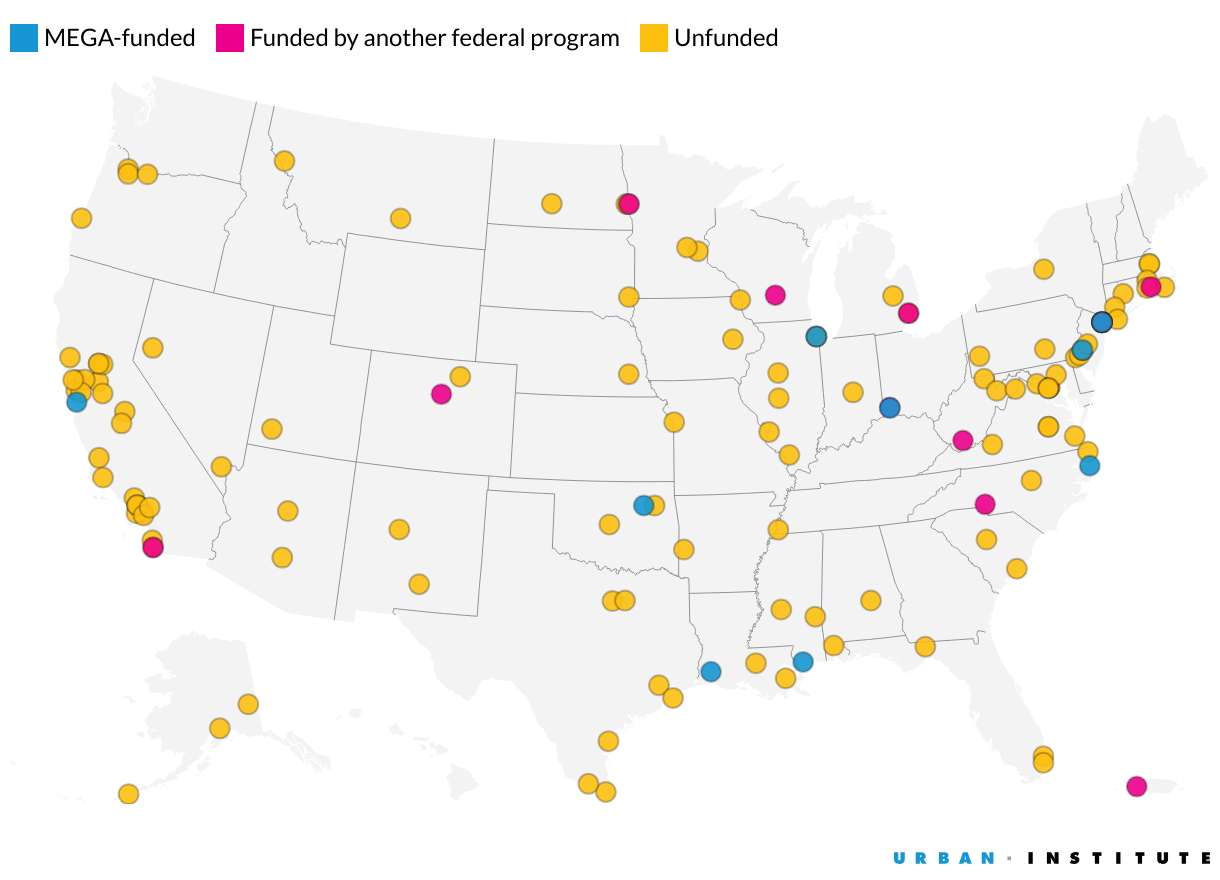
The data visualization team at the Urban Institute creates many map projects that tend to have a shared design requirement: a choropleth map that displays relevant information for a selected geography which is often too complex or too long to fit inside a tooltip:
Historically, this team would need ample development time to meet this design requirement when using vanilla JavaScript and d3’s geography tools (or Mapbox). Thanks to Datawrapper’s chart interaction events messages and Svelte, an easy-to-use JavaScript framework, we can reduce development time for these projects. I’ll discuss the surprisingly few steps that went into creating the project above: configuring the Datawrapper visualization, adding the interaction events JS, configuring Svelte stores, and displaying the store values.
Why/how did you start using Datawrapper?
My first deep exposure to Datawrapper was in my current role as a Data Visualization Developer at the Urban Institute. In my interview for the job, I actually brought up how I noticed Urban creates many of their own JavaScript-based visualizations, and wondered if there was a plan to incorporate a drag-and-drop, web based tool like Datawrapper. Turns out the team was in the process of bringing on Datawrapper as the primary visualization tool for the Urban Wire blog!
How do you use Datawrapper (in your team)?
We’re just getting started using Datawrapper for larger features and data tools, as I’ll discuss in my talk, as well as exploratory data analysis if I don’t feel like jumping into R. But today, the main use is for the Urban Wire blog.
Typically, research teams from across 10+ policy centers at the Urban Institute contact the centralized Communications team to write a blog post together. The blog and writing teams work with researchers to discuss the goal, audience, and framing of the proposed topics. Researchers might have initial draft figures (created in R or Excel) to support the writing, which the blog team then finalizes in Datawrapper. Our data visualization team is there to support the blog team with any advanced visualizations that might involve tricky data formats or tooltips and tables involving custom HTML.
We really enjoyed Ben's talk at Unwrapped! You can find more about him on LinkedIn and his website. To learn more about the conference and other great speakers, visit our blog.