Secure your account with passkeys & better access controls


Today, Datawrapper is introducing multiple features to make accessing your account safer and more convenient: passkeys, new security settings, and better controls for teams and organizations.
Introducing passkeys
You can now use passkeys to sign in to your Datawrapper account. Passkeys allow you to sign in safely without remembering a password. They are saved on your browser, device, or password manager, and allow you to sign in without having to enter anything – not even your email.
Compared to passwords (even the ones with two-factor authentification enabled), passkeys are both simpler and more secure. That means fewer login hurdles and stronger protection against phishing.
Manage all devices signed in to your account
You’ll find passkeys — and everything related to account security — on the new Security page in Datawrapper. It's the new central place to manage how you access your account.
On the Security page, you’ll also find a new overview showing all devices currently signed in to your account. You can easily review where you are signed in and log out of any session if needed:


Making sure it’s really you
Strengthening your account security is important to us, whether you use passkeys or another sign in method. Multi-factor authentication (MFA) with one-time passwords remains available for users on all plans. And if you haven’t set up MFA, we’ll now use email verification codes as an alternative second factor in more situations to help make sure it’s really you.
Easier sign in with single sign-on
For Enterprise customers using single sign-on (SSO), we made signing in easier: Rather than having to rely on your workspace’s SSO link, you can now also enter your email address and sign in with single sign-on directly from the Datawrapper sign in page.
Set a sign in method for your workspace
As a workspace manager, you can now define the preferred sign in method for the whole workspace, prompting all members to use two-factor authentication or single sign-on:
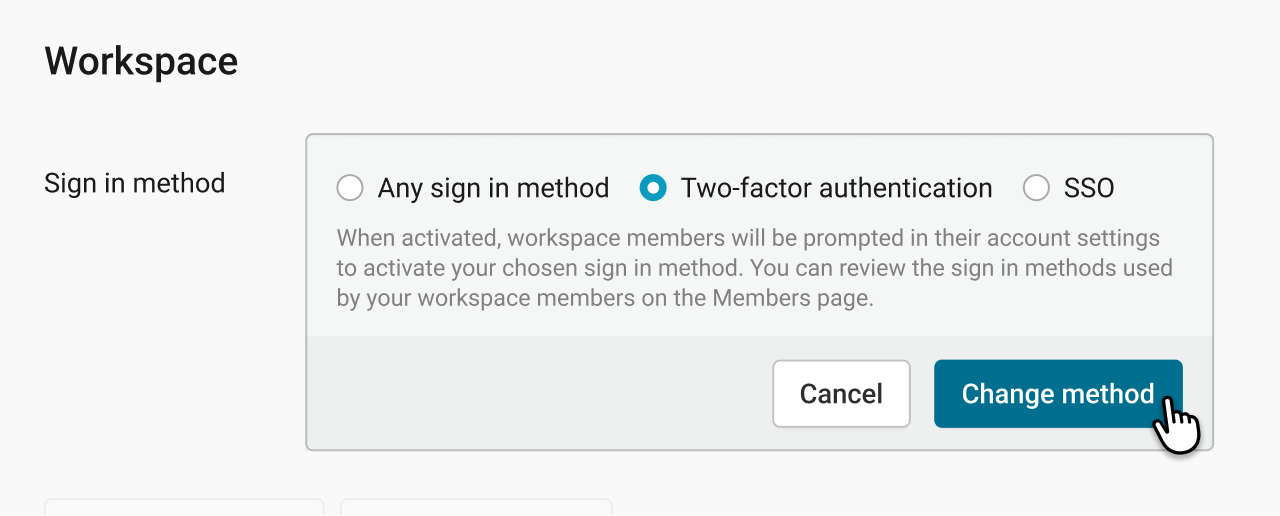
This gives your team a clearer, more consistent login experience and makes it easier to align Datawrapper with your organization’s security policies.
We hope these updates make it easier for individuals and teams to keep their accounts and content safe. Please let us know if you have any feedback at support@datawrapper.de.


